So, I have the navionics gold maps, and there seems to be a problem once you update with the latest update from navionics.
I have not been able to find anything on their website, but this is what happens.......on some bays, like in Sugar and Rhodes, there are areas that are blacked completely out and labeled as first harbor and second harbor.
Does anyone know what this is, and secondarily, does anyone know how to turn that crap off.
Any help would be greatly appreciated.
Here is what they look like:
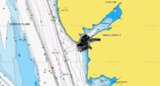
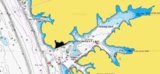
Again, any help would be appreciated.
Thanks,
Geo.


Originally Posted by GeoFisher


 Reply With Quote